Blog
Does a VPN hide your IP address?
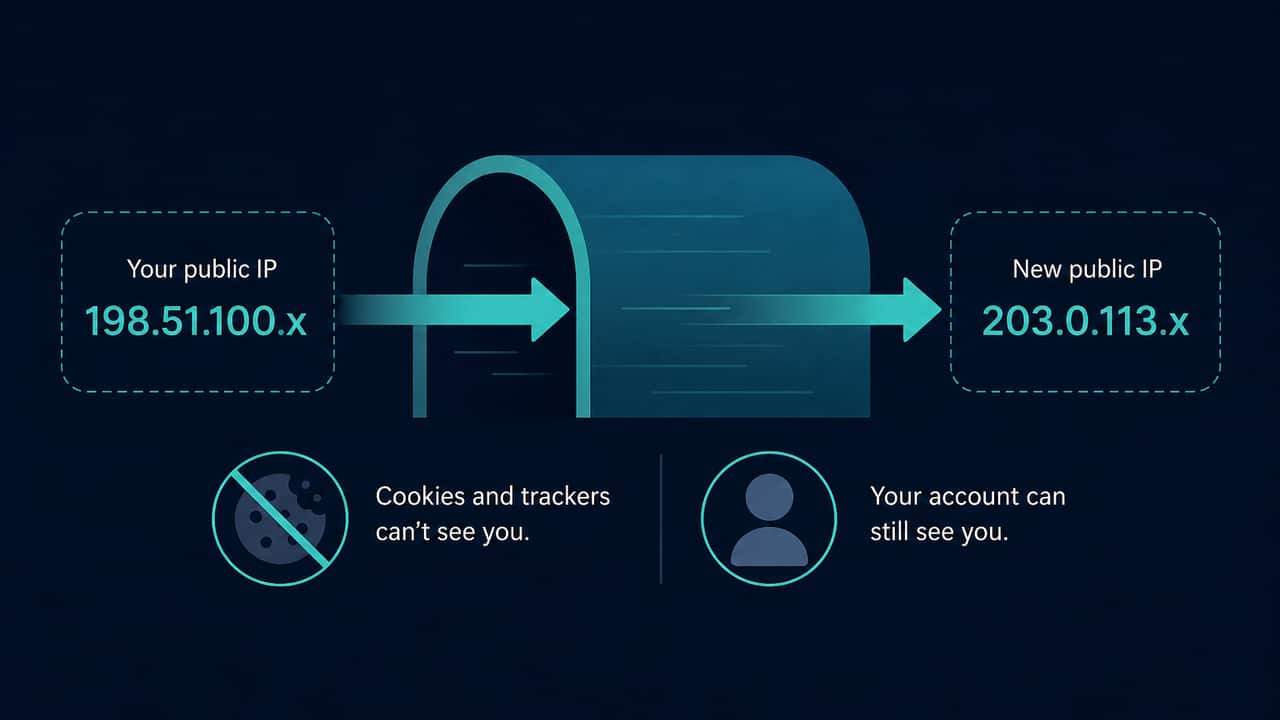
When a VPN tunnel actually covers this browser, websites and IP lookup services typically see the VPN exit address instead of your ISP address. That is IP substitution, not invisibility. It does not hide cookies, logged-in sessions, or every tracker, and it is not a legal promise.
If the address string does not change after you connect, this browser is not using the exit yet. The VPN window can still say “connected.” Those two facts can be true at the same time.
This article is the search-intent explanation. The troubleshooting walkthrough lives at Does a VPN hide your IP address?. Use that guide when the app looks on and the number does not move.
What “hide” can honestly mean
Hide, here, means: ordinary HTTPS from this browser no longer presents the previous public IP to the sites and lookup providers it contacts.
It does not mean:
- The ISP cannot see that you connected to a VPN endpoint
- DNS is protected (this site does not test DNS leaks)
- Every app on the device uses the tunnel
- You are anonymous
- Geolocation will show the city you picked in the app
Country and city labels come from third-party databases. They can lag or place a datacenter IP in a neighbouring region. A mismatched flag is not, by itself, proof that the tunnel failed. See why a VPN location can look wrong.
How to verify substitution locally
- Open What is my IP and note the IP string and, if present, ISP. Do not publish the full address.
- Connect the VPN, wait until the app finishes, then look up again in the same browser profile.
- If you want a timestamped comparison, save a baseline on the VPN test first, change only the VPN, then test again. The tool compares IP, country, and ISP. It does not detect a VPN automatically and will not guess a brand.
If IPv4 moved and you still care about a second family, run the IPv6 test. A visible IPv6 address means IPv6 connectivity exists on this path. That is not automatically a leak. IPv6 exposure vs a VPN leak explains the difference.
When the IP does not change
Common explanations, none of which this page can confirm from the outside:
- Split tunneling excludes this browser
- A work profile or “open this site without VPN” list
- Mixing a system VPN and a browser extension
- A failed or half-open reconnect
- You compared a cached tab with a fresh connection
Work through VPN connected but the IP is not changing rather than assuming the product is fake or that this website “detected” anything.
What still identifies the browser after an IP change
- Account cookies and login sessions
- Payment methods and saved addresses on shopping sites
- Language, timezone, screen, and WebGL on the browser privacy test
- WebRTC ICE candidates, if a different public IP appears — see What is a WebRTC leak?
If the IP changed and ads still look familiar, trackers may still have cookies or accounts. That is not proof the VPN failed. It is proof that IP substitution is one layer.
Dedicated IPs and “residential” exits
Some products sell a dedicated exit address. That address can still geolocate like generic hosting space. Vendor documentation discusses this mismatch; this site does not turn it into a feature ranking or a discount claim.
A dedicated IP is still an IP. Websites see that address. They do not see a magic “anonymous” flag.
Myths this question attracts
“If the IP changed, websites cannot detect a VPN.” Some services try to classify hosting ranges. Classification can be wrong. This site refuses automatic “VPN detected” labels. VPN test myths beginners should ignore collects the rest of those shortcuts.
“If the IP changed, I am off the fingerprint.” No. Read browser fingerprinting explained.
“Incognito plus VPN hides everything.” Private windows do not reliably hide the public IP. Does incognito mode hide your IP?
Practical takeaway
Use a local lookup, on this browser, before and after a single connection change. Trust the IP string before the map. Treat an unchanged address as “this app is not on the exit yet,” not as a global statement about every device you own. Treat a changed address as substitution, then remember cookies and browser fields independently.
For a repeatable method, use How to test privacy before and after a VPN.
Try the matching check
These pages run in this browser. They report what they observe. They cannot prove that a VPN is on, that DNS is protected, or that you are anonymous.
Affiliate link — we may earn a commission.
Related articles
How to test privacy before and after a VPN
A fair check changes one thing: the VPN. Compare the public IP this browser uses, then optionally IPv6 and WebRTC. Unchanged fields are not a detector result.
VPN test myths beginners should ignore
Ignore automatic “VPN detected” badges, one-look map verdicts, and pages that call every ICE address a leak. Compare IP strings before and after you toggle the app.
Browser fingerprinting explained
Websites can read many browser fields without asking for a fingerprint ID. Changing your IP does not reset those fields. This page explains the difference.