Blog
What is a WebRTC leak?
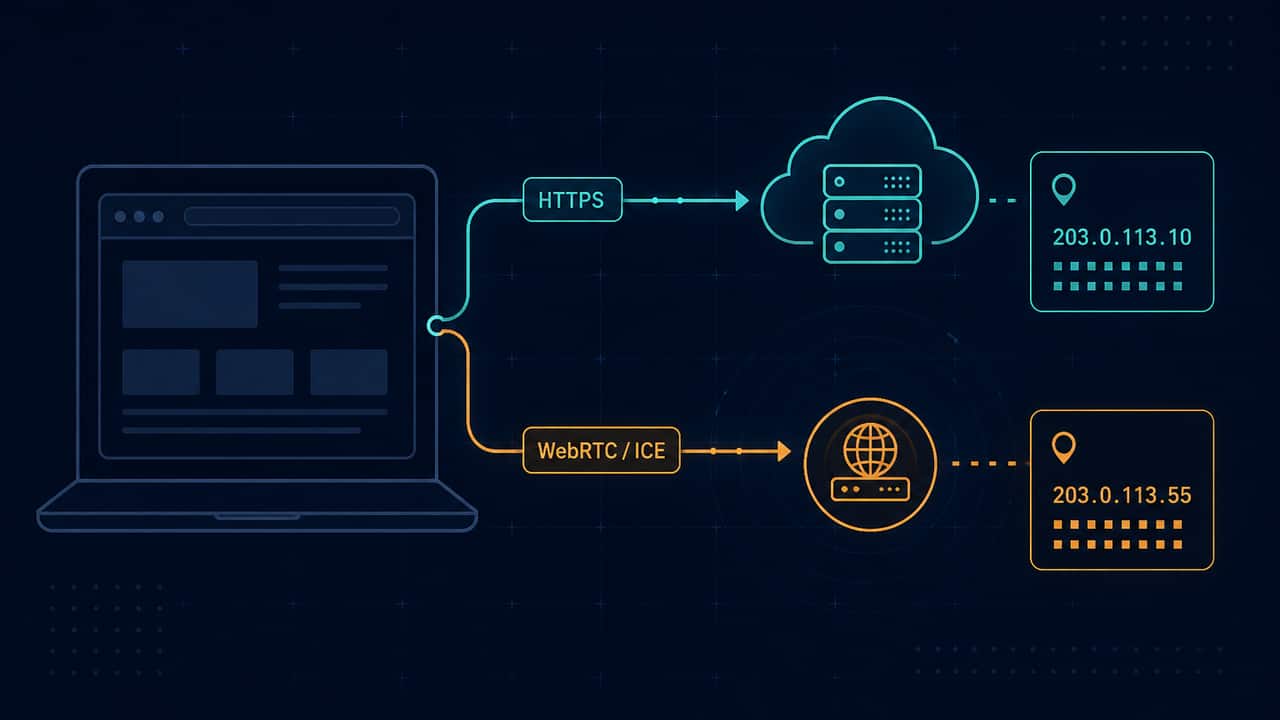
A WebRTC leak, as this site uses the phrase, means your browser advertised a public IP address through WebRTC ICE candidates that differs from the public IP ordinary websites see. Seeing addresses at all is not automatically a leak. Private addresses and .local names are expected in many browsers.
WebRTC is a standard browser feature for real-time calls, meetings, and peer connections. It is documented as the WebRTC API. It is not malware, and it is not a hidden tracker invented by this website.
What WebRTC actually exposes
To set up a peer connection, a browser gathers ICE candidates. Those candidates can include:
- A public IPv4 or IPv6 address learned via a STUN server
- A private or link-local address on a local network interface
- An mDNS hostname ending in
.local, which modern browsers often use instead of showing a LAN address
That list is an observation of what this browser was willing to advertise for a peer connection. It is not a map of every app on the device, and it is not proof that a VPN is enabled or disabled.
The WebRTC leak test gathers those candidates in this tab. Addresses are inspected locally. They are not uploaded to this site’s application server.
Observation, inference, and overclaim
Keep three levels separate.
Observation: “This browser returned these ICE candidates.”
Inference: “WebRTC used a STUN path, and at least one public address appeared.”
Not proven: “Your VPN is leaking,” “your identity is exposed,” or “every private address is a privacy incident.”
A website cannot see your VPN app’s status from a browser page. It cannot tell whether a kill switch is on. It cannot tell whether every application on the computer uses the same route.
When this site treats a result as possible leak evidence
Compare WebRTC with an ordinary public IP lookup.
- If a public ICE address matches the lookup, that is the same public path. It is not extra leak evidence.
- If a public ICE address differs from the lookup, that is the only case this tool calls possible leak evidence: WebRTC used a different public mapping than ordinary HTTPS.
- If you only see private addresses such as
192.168.x,10.x, orfe80::, that identifies a local interface. It is not labeled here as a confirmed VPN leak. - If you only see
.localhostnames, that is mDNS hiding of local addresses. It is not a confirmed leak.
This distinction matters because many “leak detector” pages treat every discovered address as a failure. That is sloppy. A home router address showing up in ICE is a common local-network fact, not proof that a tunnel failed.
Why a VPN user might still see a different public IP
If you use a VPN, WebRTC can still use a path that is not the VPN exit. Typical reasons include:
- Split tunneling that excludes the browser
- A VPN browser extension and a system VPN fighting each other
- IPv6 still using the ISP while IPv4 uses the tunnel
- A reconnect that left STUN on the old interface
Those are routing questions. They are not DNS leak results. This site does not perform DNS leak testing. Do not read ICE candidates as DNS answers.
If the public ICE address differs from the HTTPS lookup, the practical next step is to put this browser fully in the tunnel, reconnect, and test again. The WebRTC troubleshooting guide walks through that without treating every address as a leak.
What a WebRTC test cannot do
A WebRTC test in a browser tab cannot:
- Prove that a VPN is enabled
- Prove that all traffic is tunneled
- Test DNS
- See other applications (games, mail clients, background updates)
- Make you anonymous
Cookies, logged-in sessions, and browser fields still identify the browser after any ICE result. The browser privacy test lists common fields this page can read locally. A VPN is not an anti-fingerprinting suite.
How to run a careful check
- Look up the ordinary public IP on What is my IP. Note the address family. Do not post the full string in a public comment.
- Run the WebRTC leak test and wait until gathering finishes.
- Compare only public ICE addresses with the lookup.
- If you use a VPN, save a baseline on the VPN test, change the connection once, and compare IP, country, and ISP. Unchanged fields are not a detector result.
- If IPv6 is in the picture, run the IPv6 test. A visible IPv6 address means this browser currently has IPv6 connectivity. That is not, by itself, proof of a VPN leak.
Sharing results without oversharing
ICE candidates can include addresses you did not mean to publish. Do not paste a complete candidate dump, both public IPs, and a user-agent string into a forum thread. Redact before you ask for help.
If you need a shorter companion to this explainer, How to read a WebRTC test result covers the verdict labels this site uses. What private IP addresses mean covers the LAN and link-local cases in more detail.
Try the matching check
These pages run in this browser. They report what they observe. They cannot prove that a VPN is on, that DNS is protected, or that you are anonymous.
Affiliate link — we may earn a commission.
Related articles
How to read a WebRTC test result
Wait until ICE gathering finishes. Compare only public addresses with the HTTPS lookup. Private and mDNS results need a calmer reading than “exposed.”
What do private IP addresses mean in a browser privacy test?
10.x, 192.168.x, and fe80:: are local. Seeing them in ICE candidates is common. It is not the same as a second public IP on the open internet.
IPv6 exposure vs a VPN leak
Dual-stack networks can send IPv6 on a different route from IPv4. Seeing IPv6 is an observation about connectivity, not a completed leak verdict.