Blog
IPv6 exposure vs a VPN leak
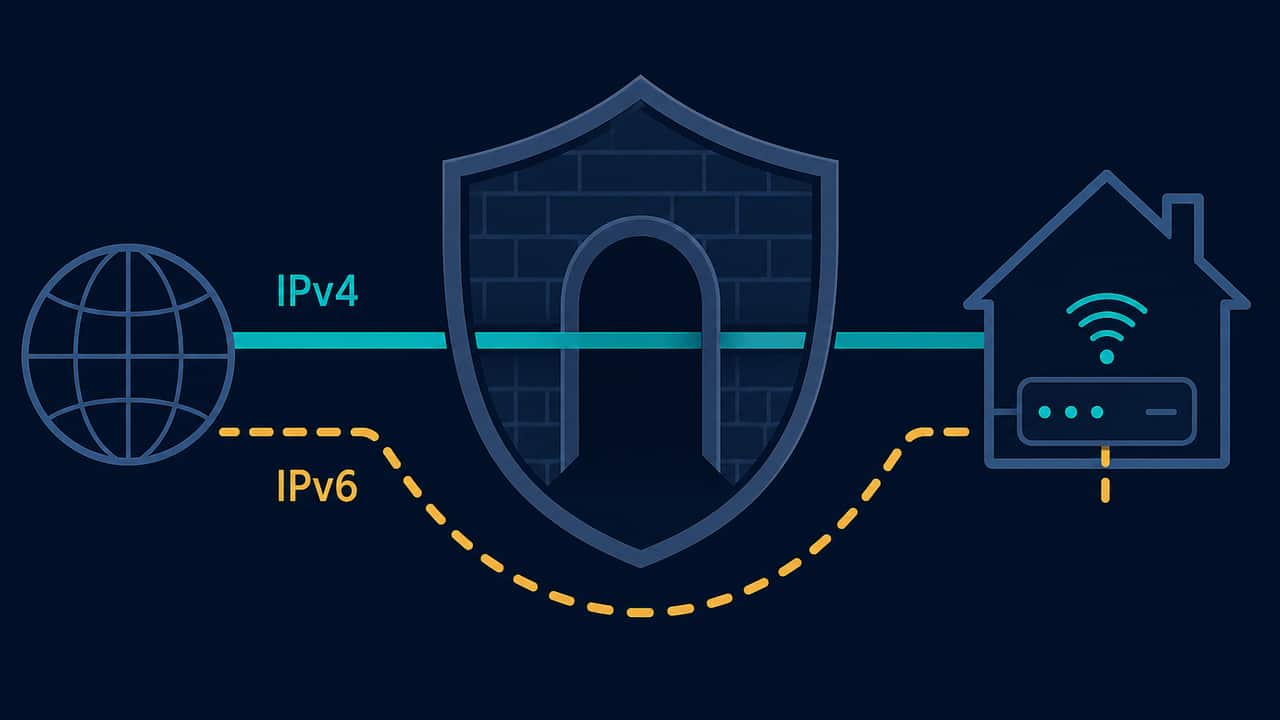
A visible IPv6 address means this browser currently has IPv6 connectivity and a lookup service received an IPv6 request from it. That is an observation. It is not, by itself, proof that a VPN is leaking, that IPv4 is unprotected, or that every app on the device uses IPv6.
Many networks are dual-stack: they offer both IPv4 and IPv6. Those two families can take different routes. IPv4 might leave through a VPN exit while IPv6 still goes to the ISP — or the reverse. A page that screams “IPv6 leak!” whenever any IPv6 address appears is collapsing observation into a verdict.
What this site can show
The IPv6 test asks IPv6-only lookup endpoints from this browser. If they answer, you see an IPv6 address. If they fail, you see that IPv6 was not available on this path, not a fake “protected” badge.
The ordinary public IP lookup may return IPv4, IPv6, or whatever the provider happened to see first. Empty city or ISP fields mean the provider did not return them. They are not guessed.
This project does not include DNS leak testing. An IPv6 result is not a DNS result.
Observation vs inference vs certainty
Observation: “The IPv6 lookup returned 2001:db8:….”
Inference: “This browser can send IPv6 to a public endpoint right now.”
Not proven: “Your VPN is leaking,” “IPv6 always bypasses VPNs,” or “you have no privacy.”
A website cannot reliably prove that a VPN is enabled. It cannot see the VPN app, the system routing table, or whether a kill switch covers IPv6. The only honest comparison is before/after, on the same browser, after you change the connection yourself.
Why IPv4 and IPv6 often disagree
On a dual-stack home or office network, the default IPv4 route and the default IPv6 route are separate. A VPN that only installs an IPv4 tunnel leaves IPv6 on the ISP path. Some apps prefer IPv6 when both are available.
That pattern shows up as:
- IPv4 changed after you connected a VPN; IPv6 still looks like the ISP
- IPv6 appeared in a lookup even though you “only use IPv4”
- WebRTC ICE candidates listed a public IPv6 address that the HTTPS IPv4 lookup did not show
The last case is a different public mapping, which the WebRTC leak test may treat as possible leak evidence if that IPv6 address is public and differs from the ordinary lookup. A private or link-local IPv6 address (fe80:: or unique-local fc00::/7) is not treated here as a confirmed leak. See what private IP addresses mean.
What “IPv6 leak” usually mixes together
People use “IPv6 leak” for several different facts:
| What you saw | Careful reading |
|---|---|
| Any IPv6 address appeared | Connectivity exists. Not a finished leak verdict. |
| IPv6 still looks like the ISP after IPv4 moved | The tunnel may not cover IPv6. That is a routing gap to check, not a DNS test. |
| Public IPv6 in WebRTC differs from HTTPS | Possible extra path for peer connections. Compare on the WebRTC test. |
| IPv6 lookup failed | This browser did not complete an IPv6 lookup. That is not a privacy guarantee. |
The middle row is the useful VPN question: is IPv6 included in the same tunnel as HTTPS? You answer that by comparing addresses before and after a reconnect, not by treating IPv6 as inherently hostile.
How to check without overclaiming
- Note IPv4 and, if shown, IPv6 on What is my IP.
- Run the IPv6 test on its own so you are not mixing families.
- If you use a VPN, save a baseline on the VPN test, connect or disconnect once, and see which of IP, country, and ISP moved. The tool does not detect VPN brands.
- If the numeric IPv4 changed but IPv6 did not, treat that as a routing question for this browser. It does not prove other apps are covered or uncovered.
- Recheck after a clean reconnect. A half-open session can keep one family on the old path.
The companion guide VPN connected but the IP is not changing is for the case where even IPv4 stays put. How to test privacy before and after a VPN is the longer before/after method.
What IPv6 does not tell you
A public IPv6 address is still just an address. Geolocation attached to it can be wrong. Country labels come from third-party databases, not GPS. See why a VPN location can look wrong if the flag disagrees with the app.
IPv6 also does not hide cookies, logins, or browser signals. If the address changes and a shopping site still knows the cart, the account session did not travel with the IP. That is expected.
Practical takeaway
Use IPv6 as a connectivity and routing check, not as a scare label. If this browser can reach an IPv6-only endpoint, write that down. If a VPN is supposed to cover this browser, check whether that IPv6 address moved when IPv4 moved. Stop before treating one visible address as a completed leak verdict. That sentence needs more evidence than a single IPv6 string.
Try the matching check
These pages run in this browser. They report what they observe. They cannot prove that a VPN is on, that DNS is protected, or that you are anonymous.
Affiliate link — we may earn a commission.
Related articles
What is a WebRTC leak?
WebRTC can advertise addresses through ICE candidates. That is an observation. A different public IP from your ordinary lookup is the only case this site treats as possible leak evidence.
How to test privacy before and after a VPN
A fair check changes one thing: the VPN. Compare the public IP this browser uses, then optionally IPv6 and WebRTC. Unchanged fields are not a detector result.
VPN test myths beginners should ignore
Ignore automatic “VPN detected” badges, one-look map verdicts, and pages that call every ICE address a leak. Compare IP strings before and after you toggle the app.